The PX7 Audio Analyze app icon

PX7 Audio Analyze

Measure loudness and find clipped audio.

Check one audio file or a whole folder. Inspect loudness, peaks, waveform and frequency spectrum, then export a report. Your audio files stay unchanged.

macOS 14 or later · Apple silicon and Intel · less than 5 MB to download.

€15 one-time · version 1.x updates included · one app-specific key for up to 7 Macs · no account or subscription.

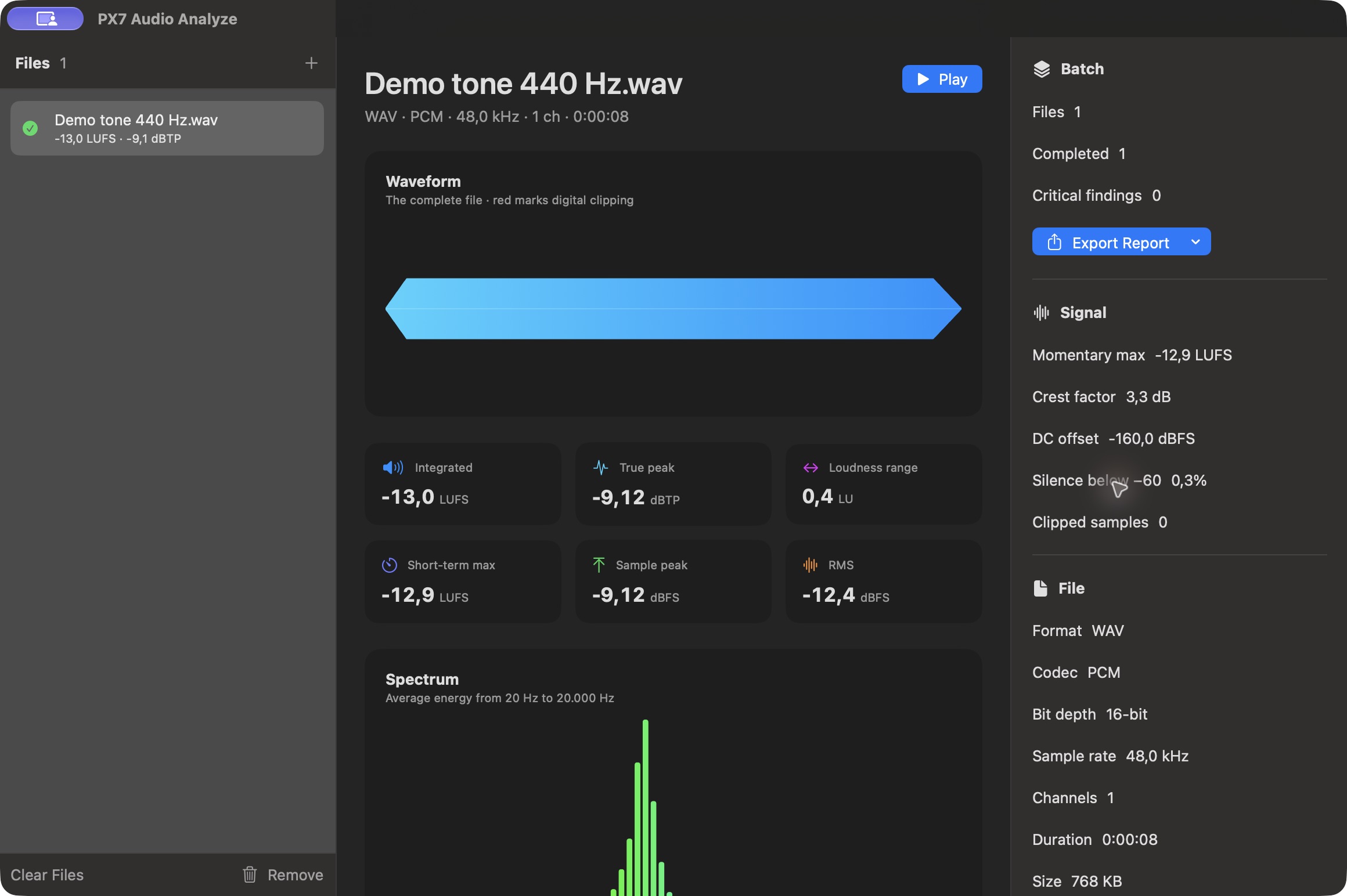
PX7 Audio Analyze displaying waveform, loudness, true peak and spectrum for a generated 440 Hz demo tone
Inspect loudness, peaks, spectrum and file details together. This screenshot uses a generated 440 Hz demonstration tone.

Check loudness, peaks and file details.

Waveform and clipped samples

See a whole-file waveform with digital clipping marked directly in the audio instead of hidden in a separate warning list.

EBU R128 loudness measurements

Read integrated, momentary and short-term EBU R128 loudness together with loudness range.

Peaks beyond the samples

Compare sample peak with a reconstructed peak estimate. Reconstruction is capped at 192 kHz; if it is unavailable, the displayed value falls back to sample peak. This is not a guarantee of detecting every inter-sample over.

Technical trouble, clearly stated

Find clipped samples, significant DC offset and long quiet sections without a vague quality score judging the music.

Frequency spectrum

A logarithmic spectrum shows the average balance from 20 Hz to the file's available upper limit.

Analyze several files in parallel

Drop a delivery folder and Analyze measures up to four files concurrently while long recordings stay memory-efficient.

Format, duration and embedded metadata

Read format, codec, sample rate, bit depth, channels, duration, size and common embedded metadata beside the signal.

CSV, PDF and JSON reports

Export the completed batch as CSV for spreadsheets, PDF for people or JSON for automated workflows.

Your audio stays yours

Analysis happens entirely on your Mac. There is no upload, account, analytics or telemetry.

Product details

Quick answers

Questions about PX7 Audio Analyze

What is PX7 Audio Analyze?
Measure loudness and inspect waveforms, spectrum, sample peaks and a reconstructed peak estimate on your Mac. Export CSV, PDF or JSON reports.
Where does PX7 Audio Analyze do its work?
PX7 Audio Analyze processes audio locally on your Mac.
How much does PX7 Audio Analyze cost?
PX7 Audio Analyze costs €15 once. It includes a seven-day trial, and one app-specific key can be used on up to seven Macs. There is no subscription.
Which Macs can run PX7 Audio Analyze?
macOS 14 Sonoma or later, Apple silicon or Intel
How do I measure LUFS on a Mac?
Open the file and the integrated loudness is measured to EBU R128, alongside momentary and short-term values and the loudness range. PX7 Audio Analyze reports all of them without changing the file.
How do I check the true peak of an audio file?
True peak is measured by reconstructing the waveform between samples, which is how a file that looks safe can still clip on playback. Analyze reports true peak next to sample peak, RMS and crest factor.
How can I detect clipping in an audio file?
Clipping shows up as consecutive samples pinned at maximum level. Analyze flags those regions, along with DC offset and silence below −60 dBFS.
Can I analyze the loudness of a whole folder?
Yes — point it at a folder and up to four files are analysed at once, with results exportable as CSV, PDF or JSON for a whole delivery.
How do I view the frequency spectrum of an audio file?
The whole-file waveform and a logarithmic average spectrum are drawn together, so a dull or harsh balance is visible without loading the file into an editor.